
A-NZ Industry Practice Statement
Guidance and Implementation Options for Specific Billing Scenarios
Version: 1.0
Publication Date: April 2023
📄 Copy available for download here
Contact the local Peppol Authority for questions or feedback:
-
Australia: eInvoicing@ato.gov.au
-
New Zealand: support@nzpeppol.govt.nz
Background
eInvoicing is the automated digital exchange of invoice information between suppliers’ and buyers’ software (e.g., accounts payable/receivable solutions, ERP, Financial Management Information Systems (FMIS) through a secure network.
More information about eInvoicing can be found at eInvoicing in Australia and eInvoicing in New Zealand.
In Australia, many energy retailers are in the process of updating their billing solutions for individual and small business customers to meet the needs of the Australian Energy Regulator’s (AER) Better Bills Guideline.
As some of those retailers are considering implementing eInvoicing at the same time, a working group was formed by interested stakeholders including large businesses (energy retailers and customers), bookkeepers (representing large and small customers) and software solution providers, to identify how eInvoicing can support common billing scenarios.
Purpose
The billing scenarios identified and discussed by the group may be applicable to different market sectors.
The document summarises the use cases and the considerations for each implementation option. It aims to support entities and service providers when considering their own business and regulatory requirements and determine an optimal solution.
Scope
This document discusses billing scenarios and considerations for Peppol implementations. It does not intend to develop segment-specific invoicing specifications or to dictate specific ‘mapping’ guidance.
For data mapping guidance, please refer to the outcomes of the Consistent Data Mapping focus group, which was co-chaired by the A-NZ Peppol Authorities and DSPANZ.
NOTE: Similar to other industry practice documents that are developed by the A-NZ Peppol Stakeholders Working Group, this is a living document that may be updated based on feedback and/or new billing scenarios that are raised.
Useful resources:
-
Sample eInvoices/credit notes for different billing scenarios
-
A-NZ Peppol Invoice Extension (eInvoice specification)
-
Guidance documents to assist with Peppol implementation in A-NZ
-
Consistent data mapping guidance developed by the A-NZ Peppol Stakeholders Working Group
eInvoicing considerations in general
Varying data capabilities by solutions
The accounts payable/receivable, software solutions have varying capabilities to store and display data.
For example, accounting software used by small businesses might only support basic invoicing/finance data and solutions for larger businesses are usually more sophisticated and support richer data.
Data requirements and existing business processes
Data requirements and processing can also vary depending on customer business requirements. For example, it is recognised that commercial and industrial (C&I) customers generally have more complex requirements and often customised solutions. E.g. large customers commonly require specific data / attachments to facilitate internal processing, which can remain the same when using eInvoicing.
Existing business practices should also be considered when implementing eInvoicing:
-
Commonly, large business customers who receive consolidated bills for multiple premises or supply addresses require detailed breakdowns of costs/charges for each site.
-
These are often provided by suppliers in spreadsheets, customised as requested by customers, and can be provided with the bill/invoice via email or via a portal.
-
Customers commonly have internal processes to reconcile and verify costs using spreadsheets – e.g. upload to internal processing systems or use macros before a bill/invoice is approved for payment. This process is sometimes undertaken by a third party.
-
-
Customers may use other approaches to manage their bills/invoices, for example:
-
Refer to the total payable amount, and only refer to charge details if required.
-
Forward bills/invoices to a bookkeeper for processing and entering into their accounting systems.
-
-
Customers commonly require ‘additional’ information (i.e., information that goes beyond the standard accounting details) to process bills, such as specific identifiers, supplier address, and clear descriptions of costs, tariffs or credits/adjustments.
-
Customers might regularly monitor their consumption of certain supplies and rely on graphical trend analysis of historical usage included on their bills.
-
When product consumption is for a mixture of business and personal use, customers will need to allocate the costs accordingly, as they do today, through manual adjustments in their systems.
Recommendations
Considering the above, the following approaches can be considered.
-
Where practical, the eInvoice (XML) should include enough detail to support more sophisticated customer systems or processing needs.
- Receiving extra data will not cause invoices to be rejected. Customers or receiving systems can ignore the data that is not required or unable to be consumed or displayed in the receiver’s user interface.
This may allow suppliers to use the same billing solution (or minimise customisation) for different customer cohorts with different and changing requirements or solution capabilities. Future changes to supplier systems, driven by changing customer requirements and evolving/maturing receiving solution capabilities may be mitigated to some extent by ‘future proofing’ sending solutions to cater for the highest-level receiver requirements from the outset, while ensuring key information is included in a way that less sophisticated systems can make use of.
-
Bills (e.g. PDF) or spreadsheets that are currently available to customers can continue to be provided as attachments to the eInvoice.
-
Relevant accounts payable data arrives directly into the receiver’s software via the XML part of the eInvoice, facilitating automation and removing the need for manual handling, while also providing access to necessary supporting information via attachments.
-
This may ease the change management implications and support customers to continue using their current processes. For example, a large business may need to upload a customised spreadsheet to a processing tool; or a small business customer may rely on attachments to understand detail such as usage trends to verify the cost, and graphs are routinely used to convey information.
-
Bills commonly provide additional information and serve other purposes beyond being a payment request, such as providing marketing information or critical support information for customers.
-
Some customer accounts payable solutions might not store or display all information that the customer requires. For example, solutions might not store multiple payment methods and instructions, and customers may need to refer to the PDF for payment options.
-
Use cases
Use Case 1 – Billing to a third party
Description
Customers sometimes use a third-party provider (e.g. a property management company) to manage bills such as utilities or telecommunications, and may request their bills issued directly to the third-party provider.
For example, a customer may ask their supplier to send eInvoices to their property management company.
A range of business and technical identifiers can be used as a Peppol ID (also known as the electronic address or Endpoint ID). In Australia and New Zealand, ABNs and NZBNs are commonly used as the Peppol ID; however, entities may use other commercial identifiers (e.g. Global Location Number (GLN), DUNS Number) as required.
Considerations
The eInvoice allows the buyer’s legal identifier to be different from the buyer’s ‘endpoint’ identifier/Peppol ID.
Suppliers can use the customer’s third-party provider’s Peppol ID as advised by the customer/third-party to:
-
look up the eInvoicing capability of the third-party provider.
-
send eInvoices using that identifier if the third-party provider is eInvoicing-enabled.
Example
Buyer’s legal / business identifier may be different from its Endpoint ID.
<cac:AccountingCustomerParty> <!-- Buyer/customer details -->
  <cac:Party>
    <cbc:EndpointID schemeID="0151">58725115040</cbc:EndpointID>
    <!-- Buyer/customer 'Peppol ID' -->
    ...
    <cac:PartyLegalEntity>
      <cbc:RegistrationName>Trotters Incorporated</cbc:RegistrationName>
      <cbc:CompanyID schemeID="0151">91888222000</cbc:CompanyID>
      <!-- Buyer/customer ABN -->
    </cac:PartyLegalEntity>
  </cac:Party>
</cac:AccountingCustomerParty>
Use Case 2 – Opening balance in arrears or in credit
Description
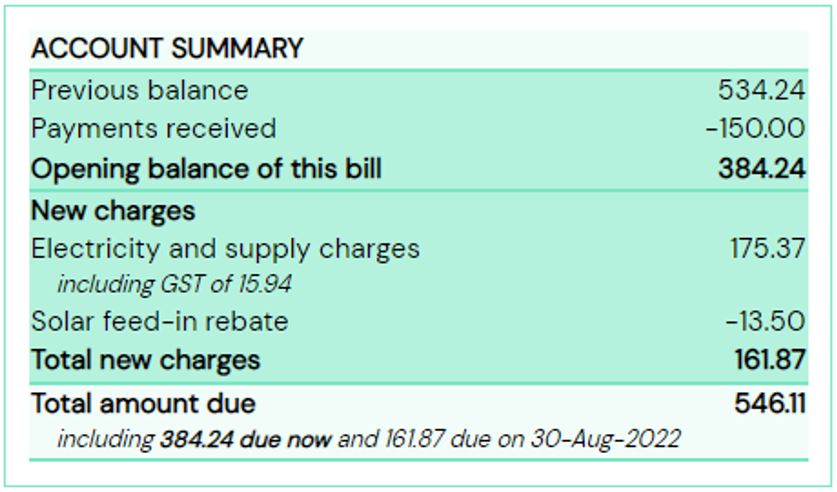
It is common for bills, e.g. utility bills, to act as both an invoice and a statement, displaying the running account balance for a customer. For example, if the customer has an unpaid amount from previous billing periods, the amount can be displayed in the new bill as ‘overdue’ or ‘amount in arrears’.
Similarly, the account balance may be in credit when a new invoice is issued.
In this scenario, a bill serves multiple purposes: as a request for payment as well as a reminder or a notification.
Considerations
Payable amount
It is recommended that the data in the XML message of an eInvoice should only include new charges (and/or rebates) that are incurred for the billing period.
eInvoicing is designed to automate the accounts payable process, and eInvoice data is expected to be processed directly into a customer’s accounts payable solution.
Including previously invoiced amounts (positive or negative) into the new total amount will effectively duplicate payable amounts in the customer’s accounting software and the accumulated net balance to the supplier will be incorrect.
Software solutions, including those used by small businesses, generally can show the total debt owing / credit to suppliers, based on payments recorded against past and current bills, and assist businesses to manage payments and cash flow.
An attachment (e.g. PDF bill) can continue to serve multiple purposes such as showing overdue amounts or the opening balance of an account being in credit and providing the account balance after the new charges and rebates.
The total of new charges and rebates for the period may result in a negative invoice total amount that will be included in the XML data.
Reminders for overdue payments
There are other channels to remind a customer of amounts owing. For example:
-
In the eInvoice XML data, a reminder can be included as free text (e.g. in the Note field), which may be displayed to customers in their software UI (depending on customers’ solution capabilities).
-
An attachment (e.g. PDF bill) can continue to display the account balance, including the carried over amount.
-
Suppliers can continue to use existing channels such as portals or SMS messages to send reminders.
User experience
eInvoicing may change the user experience, in that the amount in the eInvoice (new charges) may be different from the total payable amount in the attachment (e.g. PDF bill which may include overdue amounts).
As with all changes to billing, these may be considerations when planning change management activities, including messaging and layout/content of the attached PDF bill and other communication channels.
Example
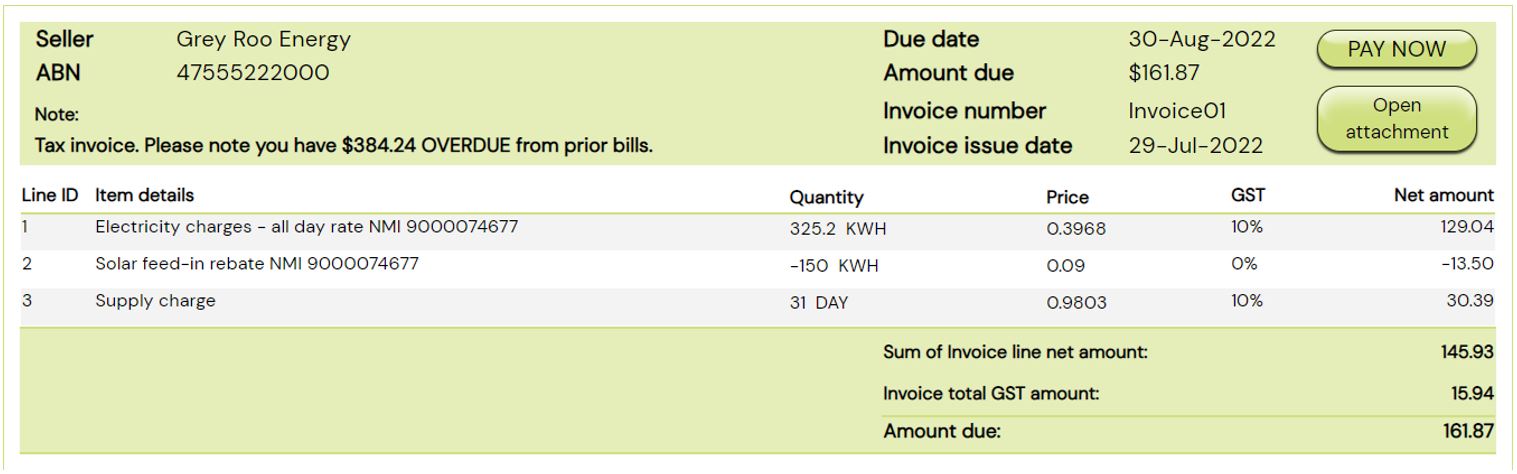
If an eInvoice includes new electricity and supply charges of AUD$159.43 (plus 10% GST) and solar rebate of AUD$13.50 (no GST in this example – e.g. a micro business not required to be registered), the eInvoice XML could include these amounts:
  <!-- Invoice Totals: -->
  <cbc:TaxAmount currencyID="AUD">15.94</cbc:TaxAmount>
  <cbc:LineExtensionAmount currencyID="AUD">145.93</cbc:LineExtensionAmount>
  <cbc:TaxExclusiveAmount currencyID="AUD">145.93</cbc:TaxExclusiveAmount>
  <cbc:TaxInclusiveAmount currencyID="AUD">161.87</cbc:TaxInclusiveAmount>
  <cbc:PayableAmount currencyID="AUD">161.87</cbc:PayableAmount>

  <!-- Invoice Lines: -->
    <cbc:ID>1</cbc:ID> <!-- Line with 10% GST -->
    <cbc:LineExtensionAmount currencyID="AUD">129.04</cbc:LineExtensionAmount>
    <cbc:Name>Electricity charges - all day rate NMI 9000074677</cbc:Name>

    <cbc:ID>2</cbc:ID> <!-- Line with zero GST -->
    <cbc:LineExtensionAmount currencyID="AUD">-13.50</cbc:LineExtensionAmount>
    <cbc:Name>Solar feed-in rebate NMI 9000074677</cbc:Name>

    <cbc:ID>3</cbc:ID> <!-- Line with 10% GST -->
    <cbc:LineExtensionAmount currencyID="AUD">30.39</cbc:LineExtensionAmount>
    <cbc:Name>Supply charge</cbc:Name>
Full xml example via PINT A-NZ webpage -> Download resources. available here.
The above eInvoice might be displayed in the buyer’s software UI as follows (noting the Amount due and the optional Note):
The attached PDF bill might display amounts in the form of an account statement that could look like:
Use Case 3 – Conditional discount
Description
Some providers offer conditional discounts such as a ‘pay-on-time’ discount.
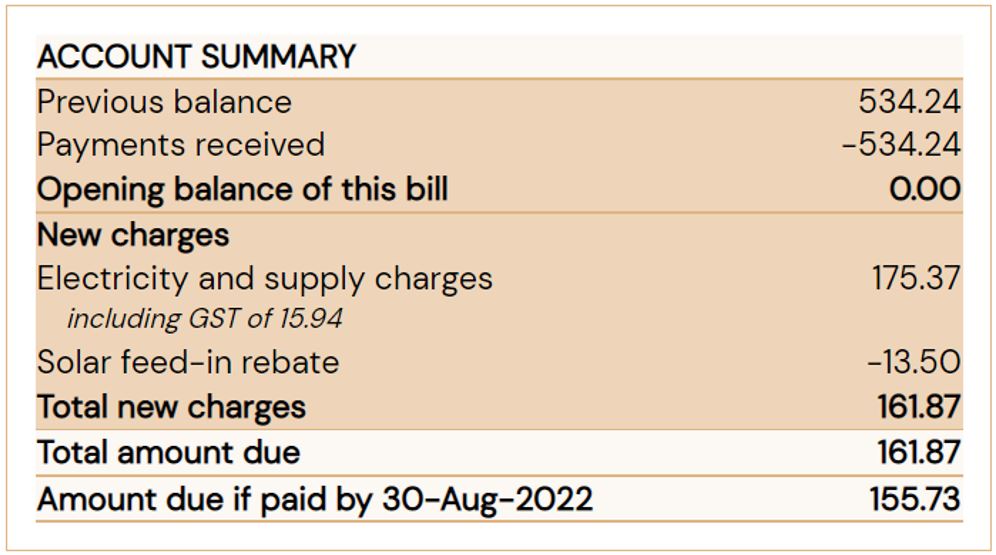
For example, a new charge of $100 has been incurred for the billing period. The invoice shows a total payable amount of $100, with a conditional discount of $10 if payment is made by the due date (i.e. total payable amount would be $90 if paid on time).
Considerations
Payable amount
The eInvoice XML data can only convey one payable amount and most accounting systems are not sophisticated enough to support multiple invoice total due amounts based on conditions.
The total payable amount in the XML data must therefore either be the:
-
Non-discounted amount
-
If the customer meets the conditions (e.g. pays on time), they can receive a credit on their next bill
-
The Note (free text field) can be used to explain the discount
-
-
Discounted amount
- If the customer does not meet the conditions (e.g. does not pay on time), they can receive an extra charge on their next bill
Example
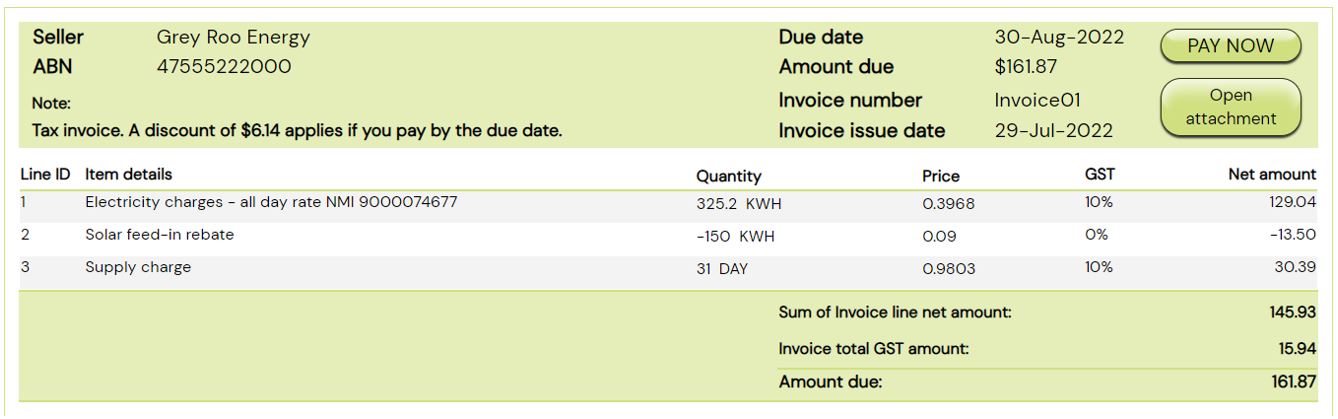
If the bill includes electricity and supply charges of AUD$175.37 ($159.43 plus $15.94 GST) and solar rebate of AUD$13.50 (no GST in this example), and a possible discount of 3.5% of $175.37 = $6.14 (calculated on the charges excluding the solar rebate), the eInvoice XML could include these amounts as follows:
<!-- Invoice Totals -->
<cbc:TaxAmount currencyID="AUD">15.94</cbc:TaxAmount>
<cbc:LineExtensionAmount currencyID="AUD">145.93</cbc:LineExtensionAmount>
<cbc:TaxExclusiveAmount currencyID="AUD">145.93</cbc:TaxExclusiveAmount>
<cbc:TaxInclusiveAmount currencyID="AUD">161.87</cbc:TaxInclusiveAmount>
<cbc:PayableAmount currencyID="AUD">161.87</cbc:PayableAmount>

<!-- Invoice Lines -->
<cbc:ID>1</cbc:ID> <!-- Line with 10% GST -->
<cbc:LineExtensionAmount currencyID="AUD">129.04</cbc:LineExtensionAmount>
<cbc:Name>Electricity charges - all day rate NMI 9000074677</cbc:Name>

<cbc:ID>2</cbc:ID> <!-- Line with zero GST -->
<cbc:LineExtensionAmount currencyID="AUD">-13.50</cbc:LineExtensionAmount>
<cbc:Name>Solar feed-in rebate NMI 9000074677</cbc:Name>

<cbc:ID>3</cbc:ID> <!-- Line with 10% GST -->
<cbc:LineExtensionAmount currencyID="AUD">30.39</cbc:LineExtensionAmount>
<cbc:Name>Supply charge</cbc:Name>
Full xml example via PINT A-NZ webpage -> Download resources available here.
Which might be displayed in the buyer’s software UI as follows (noting the Amount due and the optional Note):
For comparison, the attached PDF bill might display two ‘amount due’ values that could look like:
Use Case 4 – Consolidated invoices
Description
The term ‘consolidated invoice’ commonly refers to the scenario when charges for multiple branches (e.g. locations or meters) are ‘bundled’ into one bill.
This can apply to business entities that have multiple office locations, or property management companies that receive bundled bills for multiple shops in a shopping complex.
Considerations
An eInvoice can include multiple invoice lines, therefore this scenario does not bring additional challenges for conveying data.
Customers that manage consolidated bills commonly rely on an attachment to allocate costs. As indicated above, the attachments (e.g. PDF bills and/or spreadsheets) that are currently available to customers can be provided as attachments to the eInvoice, to support customers’ existing systems and processes.
Some suppliers and customers may use the automation benefits of eInvoicing as a catalyst to reconsider their business processes, e.g. may change to send multiple separate invoices if that will assist in reducing manual handling or optimise automated processing.
Use Case 5 – Adjusting a previous bill
Suppliers sometimes need to adjust or cancel a previous bill and re-issue a new bill, for example for utility bills when revised meter data is received after a bill is issued based on estimation.
Considerations
Similar to current billing processes, suppliers may choose to issue an adjustment or cancellation invoice as a new eInvoice transaction. The new transaction can be a negative invoice or a credit note to cancel or adjust the net payable amount, or potentially be a new invoice to replace the previously issued and cancelled invoice.
Alternatively, depending on the supplier’s processes and systems, the credit amount may be included as an invoice line on a subsequent invoice.
There are different ways to indicate a bill is an adjustment or cancellation, e.g. the PDF may have the word “adjustment” on the front page, and an adjustment is likely to reference the invoice number of the bill that is being adjusted.
In a Peppol eInvoice (or credit note),
-
the field
cac:BillingReferencecan be used to reference the previous bill number; -
The free text field
cbc:Note(invoice level) or line descriptionscac:InvoiceLine/cac:Item/cbc:Namecan indicate a previous bill / item is being adjusted.
Please note customer solutions may have various capabilities to receive/display data, and some solutions may not be able to display the previous invoice number (cac:BillingReference), in which case customers can refer to the attached PDF.
Additional information about negative invoices, invoices with zero total and credit notes
Peppol supports both credit notes and invoices with positive or negative, or zero amounts.
Negative invoices and credit notes can serve the same business purpose to inform a customer of a credit being applied to their account. Suppliers and customers may have a specific agreement to use one transaction type or both.
Please note: Credit Note and Invoice (positive or negative) are separate transaction types in Peppol, although they are almost identical, with just the amounts reversed (negative amounts in an Invoice are equivalent to positive amounts on a Credit Note).
See examples of a Peppol via PINT A-NZ webpage -> Download resources. credit note and a negative invoice. The examples effectively convey the same business information.
Some customer solutions may only support Invoices and not Credit Notes and this capability is ‘advertised’ by the customer’s Peppol providers. Billers can therefore take this into consideration when choosing the appropriate Peppol transaction that the customer (and their systems) can receive.
Use Case 6: Payment arrangements
A customer and supplier can agree on a payment / instalment plan outside of Peppol.
A bill may include specific payment options or details on an agreed arrangement, e.g. a customer is on an instalment plan.
Considerations
Peppol eInvoicing is not intended to change the current business process or preferred payment options. Depending on the agreement and supplier’s existing processes and systems:
-
Based on an agreement, a supplier may send multiple bills, each including the agreed ‘split/instalment amount’ and/or adjustment to reflect actual usage etc. In this scenario, the customer will receive multiple eInvoices for a billing period;
-
Alternatively, a common practice is to send a single invoice with flexible payment arrangements available, and a customer can choose to pay instalments at their own discretion.
Consider the varying data capabilities of the receiving solution (i.e. some solutions may not be able to display the full eInvoice/UBL message), suppliers should consider the following to ensure customers have access to the information to choose a suitable option:
-
the payment options/instructions should be included in the attached PDF; or
-
the payment options/instructions can also be included in
cbc:Note(free text), which a customer may be able to view via their solution UI.
Version Control
| Version | Date | Note |
| Initial draft | December 2022 | Initial draft |
| 1.0 | April 2023 | Incorporated feedback from the A-NZ Peppol Stakeholders Working Group (ASWG). |