
A-NZ INDUSTRY PRACTICE STATEMENT
Communicating Invoice Status via Peppol Invoice Response
Version: 1.0
Publication Date: 18 December 2020
📄 Copy available for download here
Contact the local Peppol Authority for questions or feedback:
-
Australia: eInvoicing@ato.gov.au
-
New Zealand: support@nzpeppol.govt.nz
PURPOSE
This document aims to provide guidance for service providers to support their end user clients to communicate invoice status via the Peppol network.
This document has been developed in consultation with a broad working group which was formed as part of the A-NZ service provider forum.
BACKGROUND
A common concern expressed by sellers and their service providers is the lack of confirmation on whether the buyer has accepted or rejected the invoice. This could result in sellers contacting the buyer out-of-band or incorrectly re-sending invoices.
Additionally, there is a lack of understanding of the different options or system triggers for automated invoice status communication via Peppol, i.e. using the Peppol Invoice Response message.
The A-NZ Peppol Authorities consulted with end business users as well as service providers and there has been broad support for the implementation of Invoice Response messages, with most feedback indicating that it is vital to the success of the network.
As discussed at the A-NZ service provider forum, a working group (the group) was formed to:
-
Develop a consistent understanding of these issues
-
Provide guidance to assist with implementation
Potentially this will drive better business processes and influence the evolution of the Peppol standards, so that the benefits of e-invoicing can be better realised.
SCOPE
There are three different levels of responses in the Peppol network:
-
Transport acknowledgement (Ack) – to inform the result of message delivery between two access points. Refer to Peppol AS4 specifications for details.
-
Message level response (MLR) – to inform the outcome of validation against the specification. Refer to Peppol MLR BIS for details.
-
Business level response (Invoice response) – to inform the status or outcome of corner 4 processing the message. This is corner 4’s business decision, e.g. the invoice is rejected as the purchase order number cannot be found.
This paper discusses business level response only, i.e. the Invoice Response Message.
It needs to distinguish the roles of service providers, as in when they operate as a Peppol access point (for message delivery) and when they provide add-on services for the buyer (C4). For example, a corner 3 access point provides accounts payable automation services, validates invoices based on C4-specific business rules, and sends invoice responses on behalf of C4.
There were concerns about whether the availability of Invoice Responses may be counter-productive if this assists buyers to impose additional requirements. Conversely, buyers are likely to impose specific requirements regardless of whether an automated response is possible, in which case the response message improves the efficiency for both parties to address exceptions. It was also determined that the most benefit from this would be for suppliers discovering quickly that their invoices have been rejected.
Refer to the A-NZ Industry Practice Statement - Invoice Content document for guidance on addressing buyer-specific requirements.
BEST PRACTICE STATEMENTS
Role of access point service providers
E-invoicing is seen as a catalyst for solution providers to innovate and provide solutions which will help end users’ business processes. The group has agreed that service providers play a critical role to influence their clients.
| It is best practice that all access point providers (i.e. corner 2 and corner 3) should build and support the capability of sending/receiving Peppol Invoice Response messages. It is highly recommended that end user businesses (C1 and C4) support the communication of invoice status. |
Timeframes for sending a response
Timely and clear communication of invoice status will assist sellers to improve their data quality and reduce future rejections. This is especially important for newly on-boarded suppliers.
The group has agreed on the following best practice principles:
|
Note: It is a requirement by the Peppol BIS that C1 should receive a response within 3 working days.
Implementation of Invoice Response
The Peppol BIS for Invoice Response supports the following status codes (a subset of UNECE 4343 codelist). See full list of invoice status codes.
| AB (Message acknowledgement) | Indicates that an acknowledgement relating to receipt of message or transaction is required. Status is used when Buyer has received a readable invoice message that can be understood and submitted for processing by the Buyer. |
| AP (Accepted) | Indication that the referenced offer or transaction (e.g. cargo booking or quotation request) has been accepted. Status is used only when the Buyer has given a final approval of the invoice and the next step is payment |
| RE (Rejected) | Indication that the referenced offer or transaction (e.g., cargo booking or quotation request) is not accepted. Status is used only when the Buyer will not process the referenced Invoice any further. Buyer is rejecting this invoice but not necessarily the commercial transaction. It can also be used for rejection for commercial reasons (invoice not corresponding to delivery). |
| IP (In process) | Indicates that the referenced message or transaction is being processed. Status is used when the processing of the Invoice has started in the Buyer’s system. |
| UQ (Under query) | Indicates that the processing of the referenced message has been halted pending response to a query. Status is used when Buyer will not proceed to accept the Invoice without receiving additional information from the Seller. |
| CA (Conditionally accepted) | Indication that the referenced offer or transaction (e.g., cargo booking or quotation request) has been accepted under conditions indicated in this message. Status is used when Buyer is accepting the Invoice under conditions stated in ‘Status Reason’ and proceed to pay accordingly unless disputed by the Seller. |
| PD (Paid) | Indicates that the referenced document or transaction has been paid. Status is used only when the Buyer has initiated the payment of the invoice. |
| PD with PPD | Indicates that the referenced document or transaction has been partially paid. A new Clarification Reason code “PPD” was added for the November 2020 release. It is used only when the Buyer has initiated the payment of the invoice without having paid the accepted amount in full, but has the intention to pay the full amount later. |
According to Peppol BIS, the minimum set of status that C4 need to support are “Message acknowledgement”, “Rejected” and “Approved”.
Within the required response timeframe, C4 can choose the most appropriate status code for the first response - i.e. it is not mandatory to use “AB” as the first response.
For example, if C4 has completed processing an invoice within one hour with no issues found, C4 can send only one invoice response with a status code of “AP – Accepted”. If C4 has identified an issue during processing, which requires investigation and takes longer to process, C4 may choose to send “AB” to confirm invoice receipt; or use “UQ” to notify C1 that C4 requires additional information and may follow up out of band.
The group has agreed on the following best practice principles:
|
- Remittance advice and invoice status code “Paid”:
The group has discussed the code "Paid" (which is used to indicate that the corresponding invoice has been paid) and agreed that:
a. An Invoice Response (with the code "Paid") may be used as a simple remittance advice, however noting that it will not cover complicated scenarios such as aggregated payments (one payment for multiple invoices).
b. Some C4's have already implemented remittance advice and prefer to use existing capability (outside of Peppol).
Note that remittance advice is not currently supported by Peppol however is being considered.
c. For small businesses that do not require a remittance advice, the code Accepted (AP) will provide the certainty of getting paid and the code "Paid" is not a necessity.
BUSINESS SCENARIOS
The Peppol BIS for Invoice Response Message can be found here. The picture below illustrates the structure of a Peppol Invoice Response message:
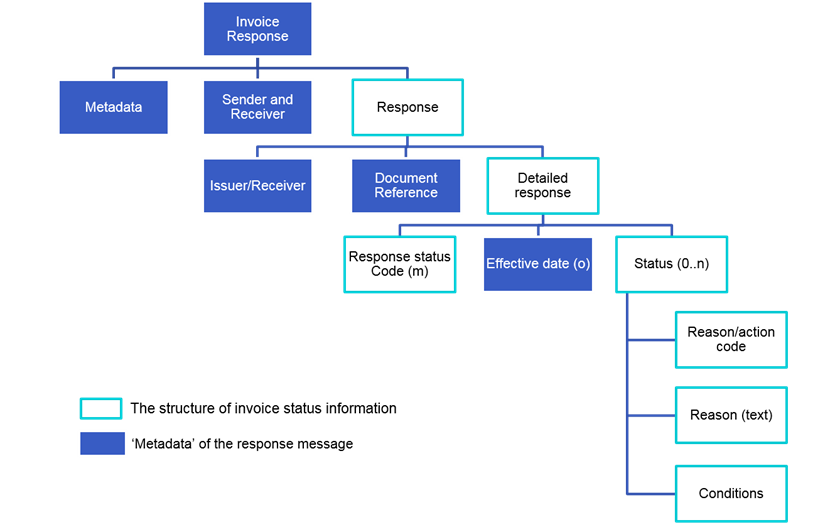
Business scenarios and UBL examples
When an Invoice Response message indicates that the invoice is rejected, under query or conditionally accepted, further information must be provided to assist C1 to take action.
This can be done using the Peppol defined Status reason codes and Status action codes. Peppol also supports a free text field (cbc:StatusReason) to provide a detailed description of the issue in addition to the defined codes.
This section describes a few common business scenarios and provides UBL examples to illustrate how C4 can communicate invoice status with C1 via Peppol.
Scenario 1 - Invoice received successfully (by C4 ERP system) or invoice has been successfully processed and approved for payment.
| Status code | Reason code |
|---|---|
| AB AP | Non - No issue (optional when invoice status is AB or AP) |
Example 1
<cac:Response>
    <cbc:ResponseCode listID="UNCL4343OpSubset">AB</cbc:ResponseCode>
    <cbc:EffectiveDate>2020-11-01</cbc:EffectiveDate>
    <cac:Status>
        <cbc:StatusReasonCode listID="OPStatusReason">NON</cbc:StatusReasonCode>
    </cac:Status>
Scenario 2 - Invoice fails 3-way matching
A common scenario is that the purchase order number is invalid or cannot be matched to the vendor. Depending on internal processes, C4 may decide to
-
Reject the invoice (RE) – see example 2 below.
-
Follow up with C1 out of channel (UQ).
-
Conditionally approve the invoice, e.g. if C4 is able to find the correct PO (e.g. matching by item, price and/or amount) and process the invoice (CA).
| Status code | Reason code |
|---|---|
UQ RE CA | REF - Reference Incorrect |
Example 2
<cac:Response>
    <cbc:ResponseCode listID="UNCL4343OpSubset">RE</cbc:ResponseCode>
    <cbc:EffectiveDate>2020-11-01</cbc:EffectiveDate>
    <cac:Status>
        <cbc:StatusReasonCode listID="OPStatusReason">REF</cbc:StatusReasonCode>
        <!-- using the free text field to provide detailed description -->
        <cbc:StatusReason>Purchase order number is invalid. The format should be POnnnnnn</cbc:StatusReason>
    </cac:Status>
    <!-- including an action code to request the sender to send another invoice -->
    <cac:Status>
        <cbc:StatusReasonCode listID="OPStatusAction">NIN</cbc:StatusReasonCode>
    </cac:Status>
</cac:Response>
Scenario 3 - GST identifier not provided
When processing an invoice, C4 needs to record and verify C1’s GST ID (in NZ) or GST branch number (in AUS), e.g. as part of internal control processes or for auditing purposes. However, the information is not provided or the identifier is invalid.
The invoice will be rejected as it is not a valid tax invoice.
| Status code | Reason code |
|---|---|
| RE | LEG - Legal information incorrect |
Example 3
<cac:Response>
    <cbc:ResponseCode listID="UNCL4343OpSubset">RE</cbc:ResponseCode>
    <cbc:EffectiveDate>2020-11-01</cbc:EffectiveDate>
    <cac:Status>
        <cbc:StatusReasonCode listID="OPStatusReason">LEG</cbc:StatusReasonCode>
        <!-- using the free text field to provide detailed description -->
        <cbc:StatusReason>Not a valid tax invoice. GST number must be provided when (specify condition)</cbc:StatusReason>
    </cac:Status>
</cac:Response>
Scenario 4 - Bank account details not correct
This could be because C1 has changed bank account details but has not informed C4. It is agreed that the information provided on an invoice should not be used to update C4’s vendor data records and most buyers (C4) will verify this information before making a payment. Human intervention is preferred to prevent fraud and the invoice is likely to be put on hold (UQ) or rejected (RE).
| Status code | Reason code |
|---|---|
RE UQ | OTH - Reasons for status is not defined by code |
Example 4
<cac:Response>
    <cbc:ResponseCode listID="UNCL4343OpSubset">RE</cbc:ResponseCode>
    <cbc:EffectiveDate>2020-11-01</cbc:EffectiveDate>
    <cac:Status>
        <cbc:StatusReasonCode listID="OPStatusReason">OTH</cbc:StatusReasonCode>
        <!-- using the free text field to provide detailed description -->
        <cbc:StatusReason>Bank account details are not correct</cbc:StatusReason>
    </cac:Status>
</cac:Response>
Scenario 5 - Vendor details cannot be verified or matched with C4’s vendor master data.
| Status code | Reason code |
|---|---|
| RE | UNR - Not recognised |
Example 5
<cac:Response>
    <cbc:ResponseCode listID="UNCL4343OpSubset">RE</cbc:ResponseCode>
    <cbc:EffectiveDate>2020-11-01</cbc:EffectiveDate>
    <cac:Status>
        <cbc:StatusReasonCode listID="OPStatusReason">UNR</cbc:StatusReasonCode>
        <!-- using the free text field to provide detailed description -->
        <cbc:StatusReason>Bank account details are not correct</cbc:StatusReason>
    </cac:Status>
</cac:Response>
Scenario 6 - Payment terms or invoice due date not as expected – When the payment terms or payment due date on an invoice is not what C4 expects, C4 may choose to follow up with C1 out of channel (UQ), or proceed to payment as per agreed payment terms (refer to use case 5 in Peppol BIS).
| Status code | Reason code |
|---|---|
UQ CA | PAY - Payment terms incorrect |
Example 6
<cac:Response>
    <cbc:ResponseCode listID="UNCL4343OpSubset">UQ</cbc:ResponseCode>
    <cbc:EffectiveDate>2020-11-01</cbc:EffectiveDate>
    <cac:Status>
        <cbc:StatusReasonCode listID="OPStatusReason">PAY</cbc:StatusReasonCode>
        <!-- using the free text field to provide detailed description -->
        <cbc:StatusReason>The agreed payment term should be nnnnn.</cbc:StatusReason>
    </cac:Status>
</cac:Response>
Scenario 7 - Incorrect price(s) on an invoice
Prices on an invoice are not what C4 expects (e.g. different from the purchase order); or discounts specified in the order/contract are not shown on the invoice (e.g. when purchasing more than 50 items, a 5% discount applies).
| Status code | Reason code |
|---|---|
| RE | PRI - Prices incorrect |
Example 7
<cac:Response>
    <cbc:ResponseCode listID="UNCL4343OpSubset">RE</cbc:ResponseCode>
    <cbc:EffectiveDate>2020-11-01</cbc:EffectiveDate>
    <cac:Status>
        <cbc:StatusReasonCode listID="OPStatusReason">PRI</cbc:StatusReasonCode>
        <!-- using the free text field to provide detailed description -->
        <cbc:StatusReason>The price for item nnn should be nnnn as per agreement</cbc:StatusReason>
    </cac:Status>
</cac:Response>
Scenario 8 – Logistics related issues
Logistics-related issues are often complex in nature and in most cases may require human intervention. To allow clear description of the issue, it is recommended to provide detailed descriptions in addition to the clarification reason codes, using the cbc:StatusReason field.
Common scenarios include:
-
Goods specified on an invoice were not received.
-
Goods delivered to wrong location.
-
Goods delivered are outside of delivery times which attracts penalty.
| Status code | Reason code |
|---|---|
UQ RE | DEL - Delivery issues |
- Incorrect goods delivered (e.g. C4 ordered apples, but C1 delivered oranges).
| Status code | Reason code |
|---|---|
UQ RE | ITM - Items incorrect |
-
Goods delivered is less than specified in the invoice (e.g. C4 ordered 10 apples, but only 5 apples were delivered).
-
Goods delivered is more than specified in the invoice (e.g. C4 ordered 10 apples, but 15 apples were delivered).
| Status code | Reason code |
|---|---|
UQ RE | QTY - Quantity incorrect |
- Goods delivered are damaged (fully or partially) or goods are of unacceptable quality.
| Status code | Reason code |
|---|---|
| RE | QUA - Item quality insufficient |
Example 8
<cac:Response>
    <cbc:ResponseCode listID="UNCL4343OpSubset">RE</cbc:ResponseCode>
    <cbc:EffectiveDate>2020-11-01</cbc:EffectiveDate>
    <cac:Status>
        <cbc:StatusReasonCode listID="OPStatusReason">QUA</cbc:StatusReasonCode>
        <!-- using the free text field to provide detailed description -->
        <cbc:StatusReason>The delivered items are damaged and unacceptable</cbc:StatusReason>
    </cac:Status>
</cac:Response>
Scenario 9 - Other scenarios that may cause rejection of an invoice:
-
Duplicate invoice
-
Invoice is future dated
-
Tax incorrect (e.g. incorrect GST rate)
| Status code | Reason code |
|---|---|
| RE | OTH - Reason for status is not defined by code. |
Depending on the capability of C4’s system, C4 may make reference to a particular data field and specify the correct / expected value for the field. Refer to Section 6 of Peppol BIS for Invoice Response. An example is also provided below.
Example 9
<cac:Response>
    <cbc:ResponseCode listID="UNCL4343OpSubset">RE</cbc:ResponseCode>
    <cbc:EffectiveDate>2020-11-01</cbc:EffectiveDate>
    <cac:Status>
        <cbc:StatusReasonCode listID="OPStatusReason">OTH</cbc:StatusReasonCode>
        <!-- using the free text field to provide detailed description -->
        <cbc:StatusReason>GST rate is incorrect</cbc:StatusReason>
        <!-- using the cac:Condition group to specify the field that caused the issue, and provide the expected/correct value -->
        <cac:Condition>
            <cbc:AttributeID>TaxCategory/Percent</cbc:AttributeID>
            <cbc:Description>10</cbc:Description>
        </cac:Condition>
    </cac:Status>
</cac:Response>